On this page
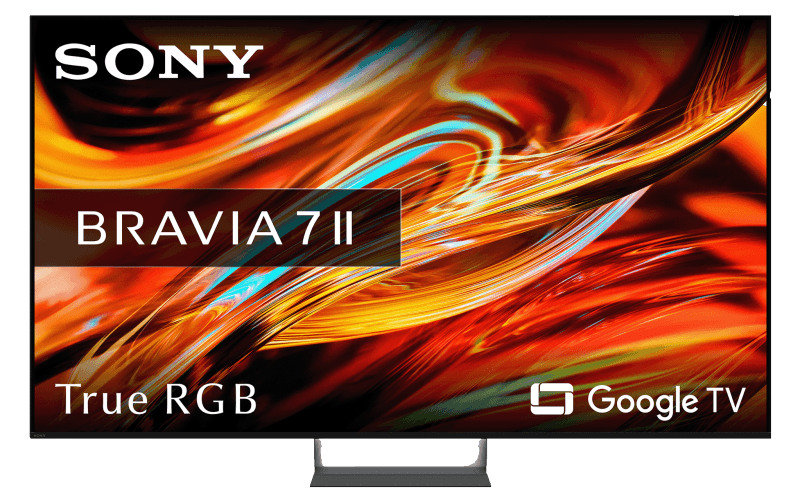
The Sony BRAVIA 7 II promises something that sounds almost too good to be true: OLED-like color and contrast with the brightness advantages of Mini LED. Its new True RGB backlight is one of Sony’s biggest television upgrades in years. But with premium pricing, just two full-bandwidth HDMI 2.1 ports, and sharply divided expert reviews, is the BRAVIA 7 Mark II really worth buying in 2026?
The answer is more interesting than the original reviews suggest. WIRED gave the television a disappointing 6/10, while RTINGS, TechRadar, and other specialist publications found considerably more to like. The difference comes down to how the TV handles real-world viewing conditions, what content you watch, and how much you pay.
Research disclosure — Updated October 9, 2026: This is an independent AYXWORKS research-based buying guide, not a first-hand laboratory or hands-on test. Specifications are checked against Sony’s documentation, while measured performance and viewing impressions are attributed to independent reviewers. Prices and firmware availability can change by region.

Sony BRAVIA 7 II: The Verdict at a Glance
The BRAVIA 7 II is Sony’s more accessible 2026 True RGB model, positioned below the flagship BRAVIA 9 II. It replaces the original 2024 BRAVIA 7 and moves from conventional Mini LED technology to an RGB Mini LED backlight.
That is a meaningful technical change, not simply another marketing label. However, better backlight technology does not automatically make it the best television at its price.
Our buying assessment:
Best for: Movie enthusiasts, Sony and Google TV users, mixed daytime and evening viewing, and PS5 owners who value strong picture processing.
Think twice if: Your room has severe reflections, you frequently watch from wide angles, you need several HDMI 2.1 gaming inputs, or a comparable OLED costs less.
What the BRAVIA 7 II gets right
- Excellent color volume from the RGB Mini LED backlight.
- Strong HDR highlight brightness and convincing dark scenes.
- Effective local dimming with restrained blooming in many scenes.
- Excellent upscaling of lower-resolution television content.
- Good motion processing for films, sports, and streaming.
- Responsive 4K/120Hz gaming with VRR and Dolby Vision support.
- Google TV, broad app support, and Sony ecosystem features.
Where it falls short
- Reflections can make dark content difficult to watch in bright rooms.
- Contrast and color can weaken when viewed from the side.
- Only two HDMI inputs support high-bandwidth HDMI 2.1 features.
- OLED alternatives deliver better pixel-level black control.
- The built-in speakers may not satisfy home cinema enthusiasts.
- The price premium is difficult to justify without comparison shopping.
Sony BRAVIA 7 II Specifications
These are the core specifications relevant to most buyers. Sony offers regional variants, so the exact model number, tuner configuration, and included accessories should be checked before ordering.
| Display | 4K LCD with RGB Mini LED local-dimming backlight |
|---|---|
| Resolution | 3840 × 2160 |
| Panel refresh rate | 120Hz |
| Screen sizes | 50, 55, 65, 75, 85, and 98 inches |
| Picture processor | Sony XR Processor |
| Backlight processing | RGB Backlight Master Drive Pro |
| HDR formats | HDR10, HLG, Dolby Vision |
| HDR10+ | Not supported |
| Smart platform | Google TV |
| HDMI connections | 4 total; 2 with HDMI 2.1 high-bandwidth features |
| Gaming | 4K/120Hz, VRR, ALLM, Dolby Vision gaming |
| Audio connectivity | HDMI eARC and digital audio output |
| Wireless features | Wi-Fi, Bluetooth, Google Cast, Apple AirPlay |
| Audio technologies | Acoustic Multi-Audio+, Dolby Atmos, DTS:X |
| European model family | XR75M2 (additional regional variants exist) |
| US model family | XR70M2 |
Sources: Sony US specifications and Sony Spain product information .
What Is Sony True RGB Mini LED?
True RGB is the most important technology inside the BRAVIA 7 II. To understand its advantages, it helps to compare it with conventional Mini LED and OLED displays.
How conventional Mini LED works
A traditional Mini LED LCD television uses a large number of tiny LEDs behind its LCD panel. These illuminate different areas of the screen, known as local-dimming zones. Quantum-dot color conversion is commonly used to expand the color range produced by the backlight.
This approach can deliver impressive brightness, but it has limitations. Because one illuminated zone can cover many LCD pixels, a bright object against a black background can produce a visible halo, known as blooming.
How Sony’s RGB backlight is different
The BRAVIA 7 II uses separately controlled red, green, and blue LEDs in its backlight zones. Sony’s RGB Backlight Master Drive Pro controls their output to generate a wider range of colors at different brightness levels.
In practice, this gives the system more flexibility over the color and brightness of the illumination reaching the LCD. Its principal advantage is color volume: the ability to maintain rich colors as image brightness increases.
But an important distinction remains: RGB Mini LED is still LCD technology, not OLED. The television still uses a liquid-crystal layer to modulate the backlight. Its dimming zones cannot independently control every pixel in the same way as an OLED display.
Why this matters: RGB Mini LED can deliver exceptional brightness and color while reducing some traditional LCD weaknesses. OLED retains a structural advantage for pixel-level black control. The better choice depends on lighting conditions, content, price, and viewing preferences.
Is True RGB the same as Micro RGB?
Not exactly. Manufacturers use labels such as RGB Mini LED, Micro RGB, and True RGB for related display approaches. Branding alone does not establish LED dimensions, zone counts, or superiority.
Look instead for independently measured brightness, blooming, color accuracy, motion handling, viewing angles, and actual screen performance. Those tell you considerably more than the name printed on the box.
Picture Quality: How Good Is the BRAVIA 7 II?
This is where independent reviews become especially valuable. Different publications evaluated different screen sizes, scenes, picture settings, and viewing conditions. Their findings are not completely aligned.
HDR brightness: Better than the original criticism suggests
WIRED’s review described brightness as disappointing for the price, but laboratory results present a more nuanced picture.
RTINGS measured approximately 1,939 nits in a 10% HDR window and about 2,097 nits in a 25% HDR window on its calibrated 65-inch review unit. Its real-scene SDR measurement was approximately 953 nits.
These are impressive figures for a television designed for mixed home viewing. Bright landscapes, sunlight, and specular highlights can look particularly vivid.
Measurements do not tell the whole story, however. A television can achieve high peak brightness while still making certain small highlights less dramatic because of its tone mapping, local-dimming priorities, or image processing.
What Hi-Fi? and AVForums raised concerns about precisely this sort of compromise: strong overall capability, but occasional limitations in the impact or separation of highlights.
RTINGS figures are from its tested 65-inch sample with documented calibration settings. They should not be treated as guaranteed results for every size or picture mode. View the RTINGS laboratory results .
Color reproduction: The strongest selling point
Color is the most consistent strength reported across independent evaluations.
Animated films, colorful landscapes, saturated game worlds, and high-quality HDR movies can look exceptionally rich. The RGB backlight helps maintain color intensity in scenes where conventional backlights may have to compromise.
TechRadar praised the television’s color reproduction, image detail, and overall visual impact. What Hi-Fi? also highlighted the balance of Sony’s picture tuning, which can produce convincing, natural-looking images without excessive saturation.
Yet vivid color is not the same as perfect color accuracy. WIRED identified inconsistent-looking skin tones during its testing, and AVForums found limitations in some wide-color-gamut results.
The reasonable conclusion is that the BRAVIA 7 II has excellent color potential, but its accuracy and consistency depend on the content, picture mode, and calibration conditions.
Black levels, local dimming, and blooming
The BRAVIA 7 II can deliver convincing blacks for a backlit LCD television. RTINGS praised its contrast and local-dimming behavior, reporting deep blacks with relatively little haloing in many challenging scenes.
What Hi-Fi? also found that blooming could be impressively restrained. Bright objects against dark backgrounds were often controlled well enough to make the backlight less distracting than on many conventional LCD televisions.
But the system is not perfect. Depending on the scene, maintaining deep blacks can involve reducing the brightness of nearby highlights. This can make small lights, stars, or fine bright details appear less intense than expected.
The tradeoff is especially relevant to movie enthusiasts: reducing blooming can preserve dark backgrounds, but aggressive control can also affect highlight impact.
Does the number of dimming zones matter?
AVForums reported approximately 340 local-dimming zones on its 55-inch BRAVIA 7 II sample. This is substantially below the zone count it reported for the larger, higher-end BRAVIA 9 II test model.
Zone count is not a universal picture-quality score. Sony’s algorithms, LED behavior, panel contrast, and processing can make a lower-zone system perform better than a poorly controlled television with more zones.
It does help explain why the BRAVIA 7 II cannot always reproduce the same fine control or highlight intensity as the flagship model. Zone counts also vary by screen size, so figures from one review unit should never be presented as specifications for the entire range.
Bright Rooms and Viewing Angles: The Real Compromise
If your television sits opposite large windows, this section could matter more than almost any benchmark.
The BRAVIA 7 II can produce enough brightness to make daytime television, news, and sports look excellent. RTINGS found that bright content held up particularly well under ambient light.
The problem is reflection handling. A bright screen is not automatically a reflection-free screen. Dark movie scenes can still become difficult to see when lights or windows reflect from the panel.
Off-axis viewing presents another limitation. As viewers move away from the center of the screen, contrast and color consistency can weaken. Blooming can also become more visible.
Sony advertises X-Wide Angle Pro to improve viewing angles, but independent testers have found that it does not eliminate these LCD characteristics.
Our recommendation: If your sofa is directly in front of the screen and you can control strong reflections, the BRAVIA 7 II makes more sense. For a wide family seating arrangement or a room with severe window reflections, compare it with an OLED and televisions specifically designed around stronger anti-reflection treatments.
Streaming, Upscaling, and Motion Handling
A premium television should make more than 4K demo clips look good. It also needs to handle ordinary streaming, broadcast channels, compressed video, and lower-resolution content.
Sony’s XR Processor is one of the reasons the BRAVIA 7 II remains competitive. RTINGS found excellent processing of lower-quality video, including effective upscaling and smoothing of compression artifacts.
That matters for a typical household where viewing includes a mix of YouTube, Netflix, older television series, live broadcasts, and high-bitrate movies.
Motion is another strength, although it is not perfect. What Hi-Fi? praised Sony’s handling of camera pans and fast-moving objects in movies. The television generally avoids turning cinematic movement into overly smooth, unnatural-looking motion.
Gaming motion is more complicated. RTINGS noted blur during very fast action, while TechRadar was more positive about responsiveness and clarity. These findings can coexist: input lag and pixel response behavior are different measurements.
Is the Sony BRAVIA 7 II Good for Gaming?
Yes. For most console gamers, it provides a strong feature set and responsive performance. But serious multi-device users should understand its connectivity restrictions before buying.
PS5, Xbox Series X, and PC gaming
The BRAVIA 7 II supports 4K at up to 120Hz, variable refresh rate (VRR), and Auto Low Latency Mode (ALLM). It also supports Dolby Vision gaming with compatible sources and offers Sony-specific features designed to work with PlayStation 5.
TechRadar measured approximately 10.4 milliseconds of input lag at 4K/60Hz on its review unit, a strong result for responsive gaming. It also reported smooth performance during real gameplay.
That measurement is encouraging, although input lag varies by refresh rate, gaming mode, processing settings, and test conditions.
The HDMI 2.1 problem explained
The television offers four HDMI connections, but only HDMI 3 and HDMI 4 provide the high-bandwidth functionality used for 4K/120Hz and VRR. One of those connections also serves as the eARC audio connection.
Consider a common setup:
- PlayStation 5 connected to one high-bandwidth HDMI input.
- Xbox Series X connected to another.
- Soundbar connected through HDMI eARC.
That configuration creates a port conflict. If the soundbar occupies one of the two capable inputs, only one remains directly available for a 4K/120Hz gaming source.
Possible solutions include using an AV receiver with appropriate HDMI 2.1 passthrough, a compatible HDMI switch, or connecting a gaming device through a supported audio system. Always verify bandwidth, VRR, and passthrough compatibility before buying accessories.
A connected PC is limited to the television’s 120Hz panel refresh rate. Buyers looking for 144Hz, 165Hz, or higher-refresh gaming should consider a different display.
Game picture quality
TechRadar found rich color, strong detail, and responsive gameplay, but noticed occasional muddy textures during fast action. WIRED reported that some darker scenes lacked the expected contrast or impact.
Taken together, these findings support a clear conclusion: this is a good gaming TV, but not necessarily the strongest gaming value against equally priced OLED or high-refresh LCD alternatives.
Audio Quality and Home Theater
The BRAVIA 7 II includes Sony’s Acoustic Multi-Audio+ technology, dialogue enhancement, room calibration features, Dolby Atmos compatibility, and DTS audio support.
These features are useful, but built-in sound quality has received mixed evaluations. TechRadar found it serviceable when properly adjusted, while What Hi-Fi? was less enthusiastic about its tonal quality and overall presentation.
If you regularly watch movies or listen at higher volumes, a capable soundbar or separate home theater system may provide a more satisfying experience.
Sony also supports integration with compatible BRAVIA Theatre equipment. Check regional availability and the exact supported combinations before purchasing.
Important: Audio synchronization firmware update
Audio connectivity deserves special attention because RTINGS documented an intermittent audio-delay issue involving certain Sony televisions running Android 14 with the MediaTek Pentonic 1000 platform.
In affected conditions, audio could gradually drift out of synchronization after changes in video mode or HDMI handshakes. The issue was particularly relevant to some gaming and external audio setups.
Sony subsequently released European firmware 114.603.100.1 on September 24, 2026. Sony’s official release notes state that it resolves a problem where audio could gradually become delayed under certain conditions.
This is a manufacturer-reported fix, not a guarantee that every audio configuration is problem-free. Owners should confirm firmware availability for their specific country and model, then retest their setup after updating.
Official Sony Europe firmware release notes
Design and Setup: The Mirage Stand
Sony has given the BRAVIA 7 II a distinctive appearance without radically changing the overall television design. The narrow black frame and understated finish help focus attention on the display.
The most unusual component is the Mirage Stand, which uses a central support and transparent element to create the impression that the TV is floating above the furniture.

Reviewers disagreed about the execution. WIRED found the transparent component too visible to achieve the intended illusion, while What Hi-Fi? praised the result and the convenience of the central support.
One practical advantage is that a central stand can fit onto narrower furniture than televisions that require widely spaced feet. Exact stand dimensions and designs vary by screen size.
The chassis is also thicker than a typical thin OLED television. If you plan to mount it on a wall, check the model-specific depth, VESA dimensions, ventilation, cable routing, and suitable bracket requirements.
Google TV and Sony’s Smart Features
Google TV is a meaningful strength of the BRAVIA 7 II. It provides broad streaming app availability, personalized recommendations, Google Cast, and integration with compatible smart home devices.
Sony adds its own picture-processing controls, movie-focused presets, and Sony Pictures Core service for compatible content and markets.
Supported models also include Apple AirPlay functionality, giving iPhone and iPad users another straightforward way to share media.
The main drawback is familiar to modern smart-TV owners: promotional banners and recommendations may make the interface feel busier than a simple app launcher.
Sony’s software capabilities also depend on region, installed firmware, available services, and ongoing third-party support.
Why Do Expert Reviews Disagree?
The BRAVIA 7 II is an excellent example of why relying on a single television review can lead to an incomplete buying decision.
| Publication | Positive findings | Reservations |
|---|---|---|
| WIRED | Color in selected content, Google TV, usability | Contrast consistency, HDR impact, price; 6/10 |
| RTINGS | Excellent HDR brightness, contrast, processing | Reflections and fast-action motion limitations |
| TechRadar | Color, picture detail, backlight control, gaming | Reflections, two HDMI 2.1 ports, some motion artifacts |
| AVForums | High measured brightness, processing, good color | Price, off-axis performance, local dimming; 7/10 |
| What Hi-Fi? | Natural picture, motion, blooming control | OLED contrast advantage, sound quality, value |
These are summaries of the publications’ findings, not ratings or test results assigned by AYXWORKS.
How can they reach different conclusions?
Television performance is highly sensitive to viewing conditions. Different reviewers may use different screen sizes, picture presets, room lighting, test material, calibration methods, and competing televisions.
A reviewer emphasizing dark cinematic scenes may weigh highlight control more heavily. Another reviewer testing color volume and SDR brightness may find the same television exceptional.
Neither observation should automatically invalidate the other. What matters is whether the limitations affect your own viewing.
Sony BRAVIA 7 II vs OLED and Other Premium TVs
The main question is not whether the BRAVIA 7 II is a good television. It is whether it offers better value than alternatives at the same price.
| Television | Main advantage | Who should compare it? |
|---|---|---|
| Sony BRAVIA 7 II | RGB color, processing, bright HDR, Sony features | Movie lovers wanting a premium LCD |
| LG C6 OLED | Pixel-level blacks, viewing angles, gaming connectivity | OLED buyers and multi-device gamers |
| Sony BRAVIA 9 II | Higher-end RGB backlight control and flagship performance | Buyers with a larger budget |
| Samsung R95H | Premium RGB technology and higher gaming refresh capability | High-end LCD and gaming enthusiasts |
| Hisense UR8 / UR9 family | Alternative RGB performance and feature priorities | Value-focused buyers comparing local prices |
BRAVIA 7 II vs LG C6 OLED
This may be the most relevant comparison for many buyers. The LG C6 uses self-emissive OLED technology, allowing individual pixels to turn off completely.
This gives OLED a clear structural advantage in black-level precision and viewing angles. The C6 also provides more high-bandwidth HDMI inputs and supports higher refresh rates than the Sony.
The BRAVIA 7 II counters with high LCD brightness, RGB color volume, Sony’s processing approach, and the absence of OLED’s permanent burn-in mechanism.
Our recommendation: If both televisions cost roughly the same and you mainly watch movies in a controlled-light room, strongly consider the OLED. If you prefer premium LCD technology, sustained bright content, or Sony’s specific ecosystem, the BRAVIA 7 II remains compelling.
BRAVIA 7 II vs BRAVIA 9 II
The BRAVIA 9 II is Sony’s premium True RGB alternative. It offers a more sophisticated backlight implementation, stronger flagship performance, and additional premium features.
Its higher price will not make sense for everyone. The BRAVIA 7 II delivers much of the underlying RGB technology at a lower entry price.
If you are already spending close to the cost of a BRAVIA 9 II, compare the exact size, real-world brightness, room reflections, speaker configuration, and discounted prices before deciding.
Sony BRAVIA 7 II Price: Is It Worth the Money?
Sony launched the 65-inch BRAVIA 7 II in the United States at approximately $2,599. TechRadar subsequently reported promotional prices around $1,799 during its September 2026 review period.
These figures are historical reference points, not live offers. UK, EU, US, and Australian prices differ, and retailer discounts can change quickly.
The price difference matters because a large discount can completely change the recommendation. At a launch-level premium, the Sony faces formidable OLED competition. At a substantially reduced price, its strengths become more attractive.
A practical buying rule
Before purchasing, compare the BRAVIA 7 II against the best OLED and premium Mini LED alternatives at the same screen size and current local price.
Do not compare a discounted 55-inch television against a full-price 65-inch model and conclude that one offers better value.
Also include delivery, installation, extended warranty costs, return conditions, and any additional audio equipment in the total purchase decision.
The Five-Point Buying Checklist
Here is a straightforward way to decide whether the BRAVIA 7 II fits your home.
- Check your lighting. Do you have large windows or lamps directly facing the screen? If so, examine reflections using dark content, not only brightly colored demos.
- Check your seating. If several people regularly watch from the side, compare color and contrast from those actual seats.
- Count your HDMI devices. List every console, PC, soundbar, and streaming device. Confirm how many require 4K/120Hz, VRR, or eARC.
- Compare your favorite content. Try a dark movie scene, a natural-looking face, a sports broadcast, lower-resolution streaming, and a fast-moving game.
- Compare the final delivered price. If an excellent OLED or superior-value Mini LED costs the same or less, the Sony needs to justify its premium through features you will actually use.
The goal is not to find the television with the longest specification sheet. It is to find the one whose strengths match your room, your content, and your budget.
Final Verdict: Should You Buy the Sony BRAVIA 7 II?
The Sony BRAVIA 7 II is a genuine improvement in television backlight technology. Its RGB Mini LED system delivers outstanding color potential, strong measured brightness, excellent picture processing, and convincing dark-scene performance in many viewing conditions.
It also offers capable console gaming, mature Google TV software, and Sony’s useful home-cinema features.
But it is not an uncompromised flagship. Screen reflections, off-axis limitations, conservative highlight handling in some scenes, and only two high-bandwidth HDMI connections weaken its appeal against strong competitors.
Above all, the price determines the final recommendation.
AYXWORKS buying verdict:
Buy it when you want a premium Sony LCD with excellent RGB color, strong processing, and a competitive discounted price.
Compare alternatives first when an equally sized OLED costs the same, you need more HDMI 2.1 ports, or your seating arrangement makes viewing angles especially important.
The BRAVIA 7 II is better than its most critical review might suggest, but it is not automatically the best TV for the money.
Frequently Asked Questions
Is the Sony BRAVIA 7 II an OLED television?
No. It is a 4K LCD television with an RGB Mini LED backlight. It uses independently controlled red, green, and blue LED elements for improved color and brightness control. Unlike OLED, its pixels are not individually self-emissive.
Is the BRAVIA 7 II the same as the BRAVIA 7 Mark II?
Yes. BRAVIA 7 II and BRAVIA 7 Mark II are names used for Sony’s 2026 successor to the original 2024 BRAVIA 7.
Is the Sony BRAVIA 7 II a flagship TV?
No. It sits below the BRAVIA 9 II in Sony’s 2026 True RGB television range. However, the BRAVIA 7 II is a premium model with advanced display technology and pricing to match.
How bright is the Sony BRAVIA 7 II?
RTINGS measured approximately 1,939 nits in a calibrated 10% HDR window on its 65-inch sample. Brightness varies with scene content, picture settings, local dimming, and screen size.
Does the BRAVIA 7 II support 4K at 120Hz?
Yes. The television has a native 120Hz panel and supports 4K/120Hz input on its compatible HDMI connections. It also supports VRR and ALLM.
Does the BRAVIA 7 II have four HDMI 2.1 ports?
No. It has four HDMI connections, but only two provide the high-bandwidth features required for 4K/120Hz and VRR. One also handles eARC audio, potentially reducing the available gaming connections.
Is the BRAVIA 7 II good for PS5?
Yes. It supports 4K/120Hz, VRR, ALLM, and Sony’s PlayStation-focused picture features. It is a capable PS5 television, although multi-console users should consider its HDMI port limitations.
Does the BRAVIA 7 II support Dolby Vision?
Yes. It supports Dolby Vision, HDR10, and HLG. It does not support HDR10+.
Is the BRAVIA 7 II better than the LG C6 OLED?
Neither is universally better. The LG C6 has advantages in black-level precision, viewing angles, and gaming connectivity. The Sony offers high RGB Mini LED brightness, impressive color volume, and Sony’s processing and software ecosystem. Price and viewing conditions should determine the choice.
What firmware should BRAVIA 7 II owners check?
In Europe, Sony released version 114.603.100.1 on September 24, 2026, including an audio-delay fix. Firmware versions and rollout schedules vary by region and model. Always use the official Sony support page.
Key Takeaways
- The BRAVIA 7 II is a premium 2026 RGB Mini LED LCD television, not an OLED.
- Its best qualities are color, HDR brightness, local dimming, and Sony’s processing.
- Reflections and off-axis viewing remain meaningful weaknesses.
- Only two HDMI ports support the television’s high-bandwidth gaming features.
- Independent reviewers disagree, so multiple tests provide a more useful picture than any single rating.
- The purchase decision becomes significantly more favorable at a competitive sale price.
Before you buy: Compare the BRAVIA 7 II with an equally sized LG C6 OLED and another premium Mini LED TV at current local prices. Check screen reflections, HDMI requirements, and return policies.
For more independent product research and practical buying advice, explore the AYXWORKS technology reviews .
Sources and Further Reading
This guide combines official manufacturer specifications with independent professional testing. Technical measurements and reviewer impressions remain attributed to their original publishers.
- Sony — BRAVIA 7 II official product page
- Sony — BRAVIA 7 II technical specifications
- RTINGS — BRAVIA 7 II laboratory review
- TechRadar — BRAVIA 7 II review
- AVForums — BRAVIA 7 II technical review
- What Hi-Fi? — BRAVIA 7 II review
- WIRED — BRAVIA 7 II review
- Sony Europe — September 2026 firmware update
Editorial note: This page contains original AYXWORKS buying analysis based on cited public information. No first-hand testing, calibration, or ownership experience is implied. Sony and BRAVIA are trademarks of their respective owner.
What matters most when choosing your next TV: perfect blacks, high brightness, gaming performance, or overall value? Share your priorities in the comments.