On this page
ROS 2 (Robot Operating System 2) is a robotics software framework for connecting sensors, perception, motion planning, diagnostics and applications. Despite its name, it is not a replacement for Linux, an industrial robot controller or a safety PLC. It provides middleware, developer tools and reusable packages that allow separate programs to exchange structured data.
For mobile robots, machine vision, simulation and research, ROS 2 helps connect otherwise independent components. An industrial deployment still needs engineering validation, cybersecurity, maintenance and an independently assessed machinery safety system. This is an educational guide based on official ROS and Nav2 documentation, not a claim of an AYXWORKS-certified installation.
Quick answer: where should you start?
First understand the ROS graph: nodes connected through topics, services and actions. Then learn why message types and Quality of Service (QoS) must match, how coordinate frames work, and how navigation uses maps and localization. Begin with a simulated robot before considering physical motion.
The official ROS 2 concepts explain the underlying interfaces and communication model.
The core communication concepts
| Concept | What it does | Industrial robotics example |
|---|---|---|
| Node | Software component in the ROS graph | Camera driver, scanner, planner, diagnostic monitor |
| Topic | Asynchronous stream of messages | LiDAR scan or robot odometry |
| Service | Request and response, normally for a short operation | Requesting a configuration-related operation |
| Action | Long-running goal, feedback, result and cancellation | Navigating to a workstation |
| Parameter | Configurable value of a node | Reference frame or timing threshold |
| Transform (tf2) | Relationship between coordinate frames | Robot position relative to map and sensor |
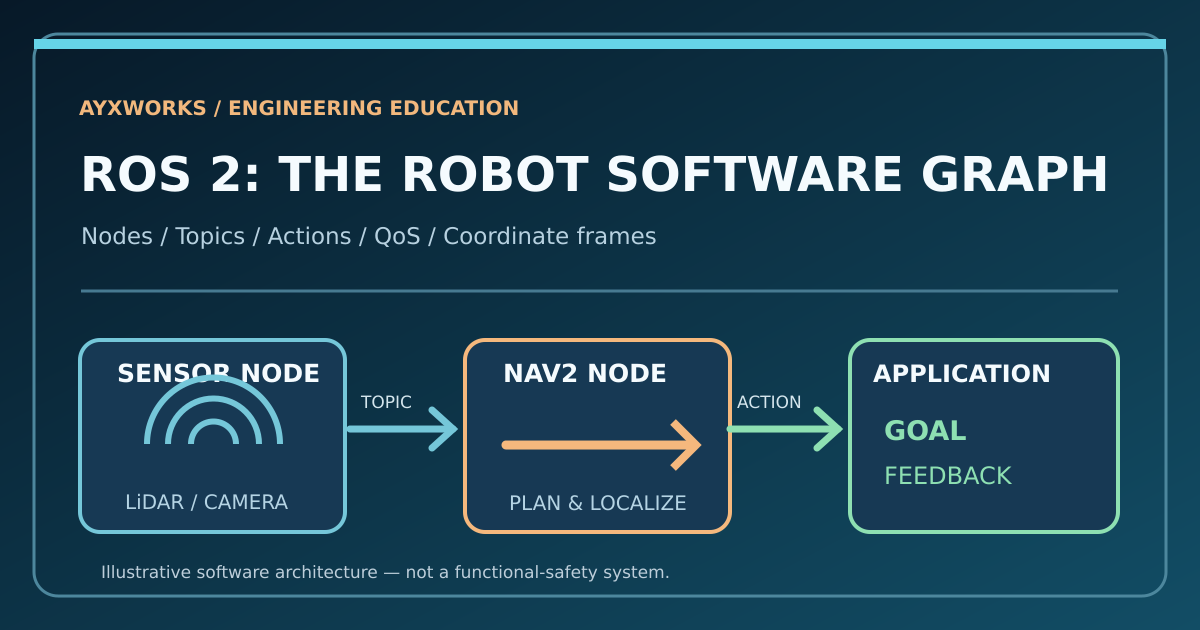
Imagine a mobile robot transporting a component. A user application requests a navigation goal. Localization estimates where the robot is. A planner produces a route, and a controller requests appropriate movement. Sensor components report the surroundings continuously. The navigation action reports feedback and completion or failure.
These messages describe software behavior. They do not establish that a physical machine is permitted to move or that a protective function has been validated. Robot drives, braking, safety fields and operating procedures require independent engineering.
Topics, services and actions: use the right interface
A topic is useful when data arrives repeatedly and multiple subscribers may need it. Examples include point clouds, encoder-based odometry, temperature measurements and camera frames. Publishers and subscribers must agree on compatible message types.
A service represents a request and response. It is not the right tool for a navigation operation that may take minutes, need progress feedback or require cancellation.
An action supports a long-running goal, progress updates and a result. Nav2 commonly exposes action interfaces for navigation missions. A goal may fail because of unavailable localization, obstacles or a lost connection; the application must handle those outcomes.
The official interfaces documentation distinguishes message, service and action interface definitions.
QoS: why a topic can exist but deliver no data
Quality of Service policies control important communication behavior. ROS 2 supports reliability, history depth, durability, deadlines and other options. A sensor stream may prefer best-effort delivery when an occasional missed sample is preferable to a queue of stale measurements. Other application data may use reliable delivery.
Reliable delivery is not a guarantee of bounded physical response time or a machine safety function. A subscriber requiring a QoS profile that is incompatible with the publisher can receive no data despite both nodes running.
Before blaming a scanner or controller, check the exact topic name, message type, publisher and subscriber QoS configuration, and whether the middleware can discover each participant.
ROS 2 Quality of Service explains policies and compatibility.
Coordinate frames: map, odom, base_link and sensors
A robot can estimate how far its wheels turned without knowing its exact location in a building. Frames help separate these kinds of information.
- base_link is a coordinate reference attached to the robot.
- odom is a locally continuous estimate of motion and can drift.
- map is a global reference associated with the navigation map.
- Sensor frames describe LiDAR, camera or other equipment relative to the robot.
The transform tree must connect the relevant frames with consistent timestamps. A scanner moved physically but left with an incorrect mounting transform can produce misleading maps and obstacle observations.
This is why tf2 and calibration deserve attention before integrating autonomous navigation. No one should enable physical movement based only on an unverified frame tree.
Which ROS 2 distribution in October 2026?
Support lifecycle and operating system compatibility matter more than choosing the highest version number.
| Distribution | Lifecycle context | Planning consideration |
|---|---|---|
| Lyrical Luth | May 2026 long-term support release; support planned until May 2031 | Tier 1 Ubuntu 26.04 on amd64/arm64 |
| Jazzy Jalisco | May 2024 release; supported until May 2029 | Good long-term choice for Ubuntu 24.04 projects |
| Kilted Kaiju | May 2025 release; scheduled support end December 2026 | Avoid starting a long-lived project without an upgrade plan |
| Humble Hawksbill | May 2022 release; supported until May 2027 | Common legacy base for Ubuntu 22.04 systems |
Open Robotics announced Lyrical Luth on May 22, 2026. Its Tier 1 binary packages target Ubuntu 26.04, not every Ubuntu release. The official distribution table provides current lifecycles.
Check whether your hardware, operating system, middleware and robot-driver packages actually support the selected distribution. A vendor driver can determine the feasible choice more than the existence of the latest ROS release.
A safe first exercise: talker and listener
Learn the CLI on a supported computer where ROS 2 and demonstration packages are already installed. The following is a benign software example, not a command sequence for moving a physical robot.
For an installation of ROS 2 Lyrical, source the ROS environment in each terminal:
source /opt/ros/lyrical/setup.bash
Start the demonstration publisher:
ros2 run demo_nodes_cpp talker
In another terminal, source the same ROS environment and inspect the graph:
ros2 node list
ros2 topic list
ros2 topic echo /chatter
The text messages let you see what a publisher sends and what a subscriber can read. Stop a demo with Ctrl+C. Substitute the correct distribution name for the installed system; never assume a package or setup directory exists.
The official ROS 2 beginner tutorials expand this exercise to services, parameters, actions and recording data.
How Nav2, SLAM and ROS 2 connect
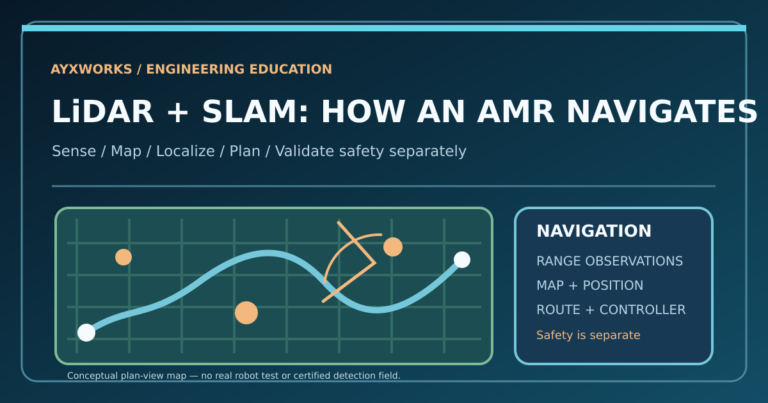
ROS 2 supplies communication infrastructure. Nav2 provides navigation-related building blocks such as planners, controllers, costmaps and behavior logic. SLAM creates and updates maps while estimating the robot pose; localization can instead estimate pose against an existing map.
The Nav2 simulation quickstart uses a simulated TurtleBot and an initial pose estimate. The SLAM Toolbox guide demonstrates mapping and navigating in ROS 2.
A navigation system is only as useful as its validated input, maps, calibration and recovery logic. A simulated route that succeeds once does not prove reliability in a warehouse with forklifts, pallets and pedestrians.
Industrial use cases and boundaries
AMRs: connect sensors, localization, task requests and mission status. Review the existing AYXWORKS AMR vs AGV selection guide and first AMR pilot questions before assuming navigation flexibility solves all logistics problems.
Machine vision: publish camera data, compare detections and transform coordinates into a chosen robot frame. Validate calibration and deterministic interfaces before putting results into production.
Industrial integration: exchange information with production systems through suitable gateways and controller APIs. ROS 2 is not a drop-in replacement for a validated fieldbus or PLC safety system. The AYXWORKS protocols comparison explains how PROFINET, EtherCAT, OPC UA and MQTT serve different purposes.
Research and education: use simulation, logged sensor data and repeatable experiments without exposing operators to moving hardware.
Security, reliability and maintenance checklist
Before production use, control which hosts and users can interact with ROS topics, services and actions. Limit network exposure and use appropriate authentication and security configurations. ROS discovery on an unmanaged network can be an unexpected source of both operational problems and access risk.
Record ROS distribution, RMW/DDS implementation, package revisions, launch settings, topic QoS, hardware versions and exact configuration. Add monitoring for stale sensor data, failed nodes, missing transforms, unexpected lifecycle transitions and delayed mission feedback.
Define what must happen when localization is unavailable or a communication link is lost. Those fail-safe responses are properties of the entire engineered system, not a guarantee supplied by a ROS installer.
Frequently asked questions
Is ROS 2 an operating system?
No. It is a robotics framework and middleware that runs on supported operating systems.
Can ROS 2 replace an industrial PLC?
Not generally. PLCs, robot controllers and safety components have other roles and validation obligations. ROS 2 can complement an application but does not automatically provide those functions.
Is an action better than a service for navigation?
Usually yes: navigation is a long-running goal that needs feedback and cancellation. Short services suit different operations.
Does ROS 2 work on Raspberry Pi?
Some supported combinations do. Confirm CPU architecture, memory, distribution and the requirements of your sensors and processing workload.
Is Nav2 equivalent to SLAM?
No. SLAM estimates a map and/or robot pose. Navigation adds planners, controllers and mission behavior. They are complementary.
Primary documentation
- Open Robotics — Lyrical Luth release and platform support
- ROS 2 — Supported distributions
- ROS 2 — Basic concepts
- ROS 2 — Communication interfaces
- ROS 2 — QoS compatibility
- Nav2 — Simulation quickstart
- Nav2 — Mapping with SLAM Toolbox
Takeaway: Learn the ROS graph, typed interfaces, QoS and coordinate transforms before adding autonomous navigation or industrial hardware. Good ROS 2 software is one component of a reliable robot system, not its entire safety case.